- About
-
Photography
-
Dubai - Photography
Dubai - Photography
- Dubai Photography
- Wedding Photography
- Pre-Wedding Photography
- Couple Photography
- Maternity Photography
- Baby Shower Photography
- Birthday Photography
- Real Estate Photography
- Event Photography
- Family Photography
- Flying Dress Photography
- Corporate Photography
- Corporate Meeting Photography
- Corporate Headshot Photography
- Food Photography
- Product Photography
- Cars Photography
- Airbnb Photography
- Music Photography
- Fashion Photography
- Kids Birthday Photography
- Ecommerce Photography
- Abu Dhabi - Photography Abu Dhabi - Photography
- Sharjah Photography Sharjah Photography
- Ajman Photography Ajman Photography
- Fujairah Photography Fujairah Photography
- Umm Al Quwain Photography Umm Al Quwain Photography
- Ras Al Khaimah Photography
-
Dubai - Photography
Dubai - Photography
- Videography
-
- Portfolio
- Blog
- Marketing
- Contact
The Complete E-Commerce Photography Checklist for Online Stores
If you run an online store, your product images can either convince people to buy or make them leave your website. Unlike a physical store where customers can touch, feel, or try a product, customers depend completely on your product images. That’s why professional product photography has become one of the most important parts of e-commerce success.
Whether you sell fashion, electronics, beauty products, furniture, food, or handmade items, high-quality product photos help customers trust your brand, understand your products better, and feel more confident about making a purchase.
In fact, great product photography does much more than make your website look attractive. It can improve your conversion rate, reduce product returns, and increase customer engagement.
In this guide, we’ll walk you through a complete e-commerce photography checklist that every online store should follow.
Key Takeaways
Before you start planning your product photography, remember these essentials:
- Use high-quality, professional images that clearly show your products.
- Capture products from multiple angles.
- Include close-up and lifestyle photos.
- Keep lighting, backgrounds, and editing consistent.
- Show accurate colours and product details.
- Optimise images for mobile devices and fast loading.
- Add descriptive file names and alt text for better SEO.
- Update your product images regularly to keep your store fresh.
Why Product Photography Matters for Online Stores
Online shopping has grown increasingly over the last few years. With thousands of customers selling similar products, your product photography often becomes a deciding factor.
Professional product images help shoppers understand:
- What the product actually looks like
- Its size and shape
- Material and texture
- Colour accuracy
- Product quality
- Important features
- How it fits into everyday life
When customers feel confident about what they’re buying, they’re much more likely to complete their purchase.
- Better Photography Builds Trust
Clear, honest product photos help shoppers feel confident that your store is professional and your products are worth buying.
- It Helps Increase Sales
When people can see a product clearly, they are more likely to trust it and add it to their cart.
- It Can Reduce Product Returns
Showing your product from different angles and in accurate colours helps customers know exactly what to expect.
- Better User Experience
Clean and consistent images make your product pages easier to browse and more enjoyable for shoppers.
- Product Photography Supports SEO
Optimised product images can help your pages load faster, rank better, and get noticed in Google Images and AI results.
Read More – How Great Product Photography Builds Customer Trust in E-Commerce
The Ultimate E-Commerce Photography Checklist
Creating effective product images involves planning every detail, from the background and lighting to editing and optimisation.
Here’s a complete checklist to help you photograph products like a professional.
1. Choose the Right Background
The background sets the tone for your entire product image. Different products require different backgrounds depending on where they’ll be used.
- White Background: A white background keeps the focus on the product and looks clean.
- Lifestyle Background: A lifestyle background shows the product in real-life use.
- Branded Background: A branded background matches your style without distracting from the product.
2. Maintain Consistent Lighting
Poor lighting creates shadows, hides details, and changes colours, while good lighting makes products look clean, sharp, and professional. The goal is to keep lighting consistent across every product image.
You can use:
- Natural daylight for softer images
- Studio lights for complete consistency
- Softboxes to reduce harsh shadows
- Reflectors to brighten darker areas
Avoid mixing different light sources, as this often creates unnatural colours. Consistency is especially important if you’re photographing hundreds of products for the same website.
3. Use High-Resolution Images
Customers love being able to zoom in before making a purchase. If your images become blurry when enlarged, buyers may lose confidence in the product.
High-resolution images allow customers to inspect important details like:
- Fabric texture
- Stitching
- Buttons
- Material quality
- Labels
- Surface finish
Compress your images without noticeably reducing quality so your pages load quickly on both desktop and mobile devices.
4. Photograph Every Important Angle
Customers want a complete view of the product before purchasing.
Include images showing:
- Front view & Back view
- Left side & Right side
- Top & Bottom
- Open view (if applicable)
- Folded and unfolded positions
- Accessories included
For products with moving parts, show them in different positions so buyers fully understand what they’re purchasing. Clearly, customers’ doubts can be significantly beneficial.
5. Show Product Size Clearly
One of the biggest frustrations in online shopping is receiving a product that’s not the right size. Help customers understand the size by including visual references.
Some effective methods include:
- Holding the product in your hand
- Showing a person using it
- Placing it on a table or desk
- Including measurements in supporting graphics
For fashion products, include model photography with size information to help customers understand the fit. Clear size references reduce confusion and minimise returns.
6. Capture Close-Up Detail Shots
Close-up photography allows customers to inspect the quality before buying.
Depending on your product, highlight:
- Fabric texture
- Stitching
- Wood grain
- Leather finish
- Buttons
- Product finish
These images communicate craftsmanship and reassure customers that they’re buying a quality product. For premium brands, detail shots often become some of the most persuasive images on the product page.
7. Include Lifestyle Images
Instead of simply showing what a product looks like, lifestyle images show how it fits into everyday life.
Lifestyle photography creates an emotional connection and helps customers picture themselves using the product. This emotional appeal often plays a significant role in purchasing decisions.
8. Show Products Being Used
Customers appreciate seeing products in action. Action shots answer practical questions that static photos cannot. These images reduce uncertainty and increase confidence because buyers can better understand the product’s purpose and functionality.
9. Maintain Brand Consistency Across Every Image
If every image has a different background, lighting style, or editing, your online store can appear unprofessional.
Keep these elements consistent across all product photos:
- Lighting style
- Background colour
- Image size and aspect ratio
- Editing style
- Colour tone
- Camera angles where possible
A consistent look strengthens your brand identity and gives customers a better shopping experience.
10. Use Accurate Colours
One of the quickest ways to lose a customer’s trust is by showing colours that don’t match the actual product. If a customer receives a product that is a different colour than what they wanted, it is likely to disappoint them.
To ensure colour accuracy:
- Use proper white balance while shooting.
- Calibrate your monitor when editing.
- Avoid adding heavy filters.
- Photograph products under consistent lighting.
Accurate colours help customers make informed decisions and reduce product returns.
11. Highlight Your Product’s Best Features
Every product has unique selling points. Make sure your photography clearly showcases them.
Depending on your product, highlight features such as:
- Waterproof materials
- Premium stitching
- Scratch-resistant surfaces
- Hidden storage compartments
- Adjustable straps
- Soft fabric texture
- Rechargeable ports
- Eco-friendly materials
Instead of relying only on written descriptions, let your images demonstrate these features.
12. Don’t Forget Packaging Photography
Showing the packaging helps customers understand what they’ll receive and creates excitement before the product even arrives.
Consider including photos of:
- Product box
- Branded packaging
- Gift wrapping
- Accessories included
- Thank-you cards
These images are particularly useful for gift products and luxury items.
13. Optimise Images for Mobile Shopping
Most online shoppers now browse and buy products using their smartphones.
Before uploading product images, check that they:
- Load quickly on mobile devices.
- Look sharp on small screens.
- Support zoom functionality.
- Display correctly in both portrait and landscape views.
- Don’t crop important product details.
A mobile-friendly shopping experience can significantly improve customer satisfaction and conversions.
Read More – Why Product Photography is Crucial for Online Sales
Image Types Every Online Store Should Have
A strong product page uses a mix of images to answer customer questions and build trust.
Include these essentials:
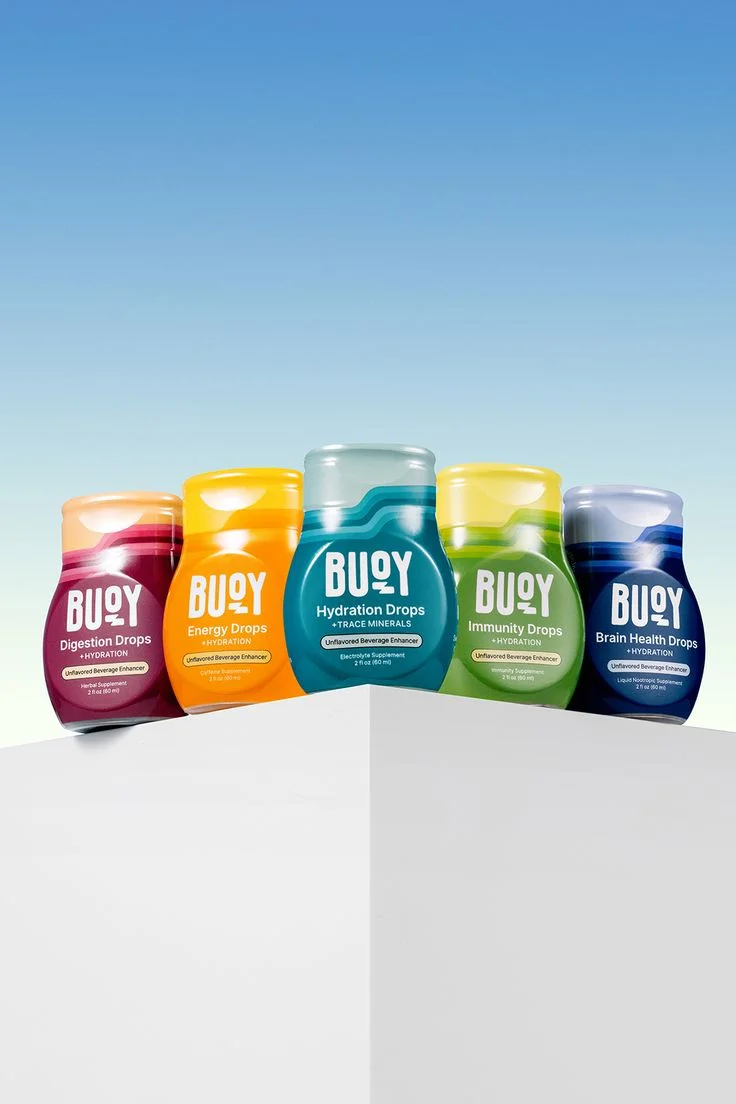
- Hero Images: Your main product photos should be clear, high-quality, and easy to understand.
- White Background Images: Ideal for marketplaces like Amazon and Noon, these keep the focus on the product.
- Lifestyle Images: Show the product in real-life use so customers can picture owning it.
- Close-Up and Detail Shots: Highlight textures, materials, stitching, and important features.
- Size Reference Images: Use models, hands, or everyday objects to show scale.
- Packaging Photos: Show what customers will receive, including boxes, inserts, and accessories.
- 360-Degree Images or Short Videos: These give shoppers a fuller view of the product and help answer common questions.
Common E-Commerce Photography Mistakes That Reduce Sales
Even great products can struggle to sell if the photography is poor.
Common mistakes to avoid include:
- Low-Quality Images: Blurry or pixelated photos make products look unprofessional and reduce trust.
- Inconsistent Visuals: Changing backgrounds, lighting, or editing styles across products creates an untidy shopping experience.
- Too Few Photos: Customers want to see products from multiple angles, not just one or two images.
- Poor Lighting and Colours: Dark images, harsh shadows, and inaccurate colours can hide details and disappoint buyers.
- Busy Backgrounds and Large Files: Cluttered backgrounds distract from the product, while heavy image files slow down your website.
- Ignoring Mobile Users: Your images should look sharp and clear on smartphones as well as desktop screens.
Read More – Complete E-Commerce Photography Checklist for Online Stores
Final Thoughts
Excellent dubai photography is one of the smartest investments an online business can make. It helps customers understand your products, strengthens trust in your brand, improves conversions, and supports your visibility in search engines. By following this e-commerce photography checklist, you’ll create product pages that are informative, visually appealing, and ready to compete in today’s online marketplace.
Remember, great product images don’t just showcase what you’re selling, but they also communicate your brand’s quality, professionalism, and attention to detail. And in a competitive e-commerce market, those first impressions can make all the difference.
Frequently Asked Questions
What is an e-commerce photography checklist?
It is a guide for the key product images your store needs.
How many product images should an online store include?
Use at least five to eight strong images per product.
Do lifestyle images really increase sales?
Yes. They help customers picture the product in real life.
Does product photography affect SEO?
Yes. Better images can improve engagement and search visibility.
Should I hire a professional product photographer?
Yes, if you want consistent and high-quality results.
What image format is best for an online store?
JPEG is best for most product photos. PNG and WebP also work well.
Can professional product photography reduce product returns?
Yes. Clear images help customers know exactly what they are buying.